- Rust 82.1%
- Python 17.9%
| Filename | Latest commit message | Latest commit date |
|---|---|---|
| assets | ||
| src | ||
| .gitignore | ||
| apple.ico | ||
| bad apple.py | ||
| build.rs | ||
| Cargo.lock | ||
| Cargo.toml | ||
| LICENSE | ||
| README.md | ||

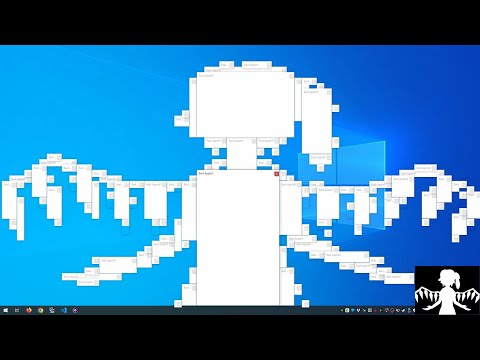
Bad Apple but it's a Windows and macOS virus
A high-performance (I've never seen anything like this run in realtime before) rendition of Bad Apple, using Windows or macOS windows as the video surface.
It's not actually a virus, but it is reminiscent of the viruses of old that were more of a nuisance than anything.
Video demonstration:
Why is it so performant?
DeferWindowPos- even the most naive of projects can go from 1fps to 15fps by using this wonderful batched API instead ofSetWindowPos.WS_EX_TOOLWINDOWto remove the taskbar entrySWP_NOREDRAWwhen moving/resizing windowsNSAnimationContextgrouping on macOS- Optimised code that only shows/hides/moves windows that need showing/hiding/moving
- Rust is blazing fast, don't you know?
Could it be faster?
I suspect that choosing which windows to move/resize, such that each is resized as little as possible, can increase performance - currently, the windows are just used from largest to smallest, which can result in some location jitter as they fit into different indexes.
Future work
All of these I have done already in small tests, but they're both difficult to make performant (copy dialogs are particularly slow), and difficult to arrange into a pleasing display.
- Spawning
MessageBoxAwindows and taking their handle (thus avoiding the need to replicate the layout ofMessageBoxAfor each version of Windows you run on) - Spawning Vista file copy dialogs using
IProgressDialog - Arranging windows in rolling sine waves, circles, etc
All of these I have not tried yet, but would be great additions:
- Water physics using hundreds of scroll bars
- Basic hard-body physics between windows
- Error noises synced with the audio (could just pre-render...)
- Notification bubbles
- Windows in the taskbar to show text (if the user has large taskbar buttons enabled)
- A large variety of error messages to delight the user with
Building and such
Should be fine to just cargo build --release.
Look at bad apple.py for the pre-processing to take an input video and turn it
into boxes.bin, a space-optimized representation of the window bounds for each
frame. The script is jank, don't come complaining.